Audacity cannot fully remove echo, because it has no built-in de-reverb effect. What you can do is make echo less noticeable: a Noise Gate (Effect → Noise Removal and Repair → Noise Gate) quiets the echo tails in the pauses between words, and an EQ cut can reduce the boomy, roomy sound. For echo inside the words themselves, you need a dedicated de-reverb tool, a third-party plugin or an AI app.
This guide shows what Audacity's built-in effects can realistically do, in the order that works best, and when to stop and use something else. The menu paths are for current Audacity versions, which group effects into submenus. Older Audacity versions list every effect directly under Effect, and their effect windows have a Manage button where newer ones say Presets & settings. The screenshots here come from one of those older versions.
Why echo is so hard to remove
Echo (reverb, in audio terms) is your own voice bouncing off walls, floor and ceiling and reaching the microphone a few milliseconds later. Unlike fan hiss or hum, it is not a separate sound: it has the same pitch and tone as the voice and overlaps every word.
That is why the usual tools struggle:
Noise Reduction learns a steady noise profile and subtracts it. Echo changes with every syllable, so there is no stable profile to learn. Audacity's manual describes Noise Reduction as meant for constant noise such as hiss, hum and buzz.
A Noise Gate can only act when the level drops, in the gaps. It cannot reach the echo that sits under the words.
EQ changes tone, not timing. It can make a room sound less boomy, but the reflections are still there.
Audacity's own forum puts it bluntly: asked how to remove echo from a recording, an experienced user answered that you can't. The honest goal in Audacity is less echo, not none.
Before you start
Work on a copy of the file, or rely on Edit → Undo (Ctrl+Z on Windows, Cmd+Z on Mac).
Listen on headphones. Echo tails between words are easy to miss on laptop speakers.
Decide how bad it is. A slightly roomy recording can sound fine after the steps below. A voice recorded far from the mic in a bare room usually cannot be rescued in Audacity alone.
Step 1: Clean up steady noise first (optional)
If there is also hiss or hum under the echo, remove it first so the later steps have a cleaner signal:
Select 2 to 3 seconds of background noise only.
Open Effect → Noise Removal and Repair → Noise Reduction and click Get Noise Profile.
Select the whole track, open Noise Reduction again, keep the defaults and click OK.
Small rooms often add a low, boxy build-up to a voice. Cutting the very low end and a little of the low-mid range can make the room less obvious.
Select the track.
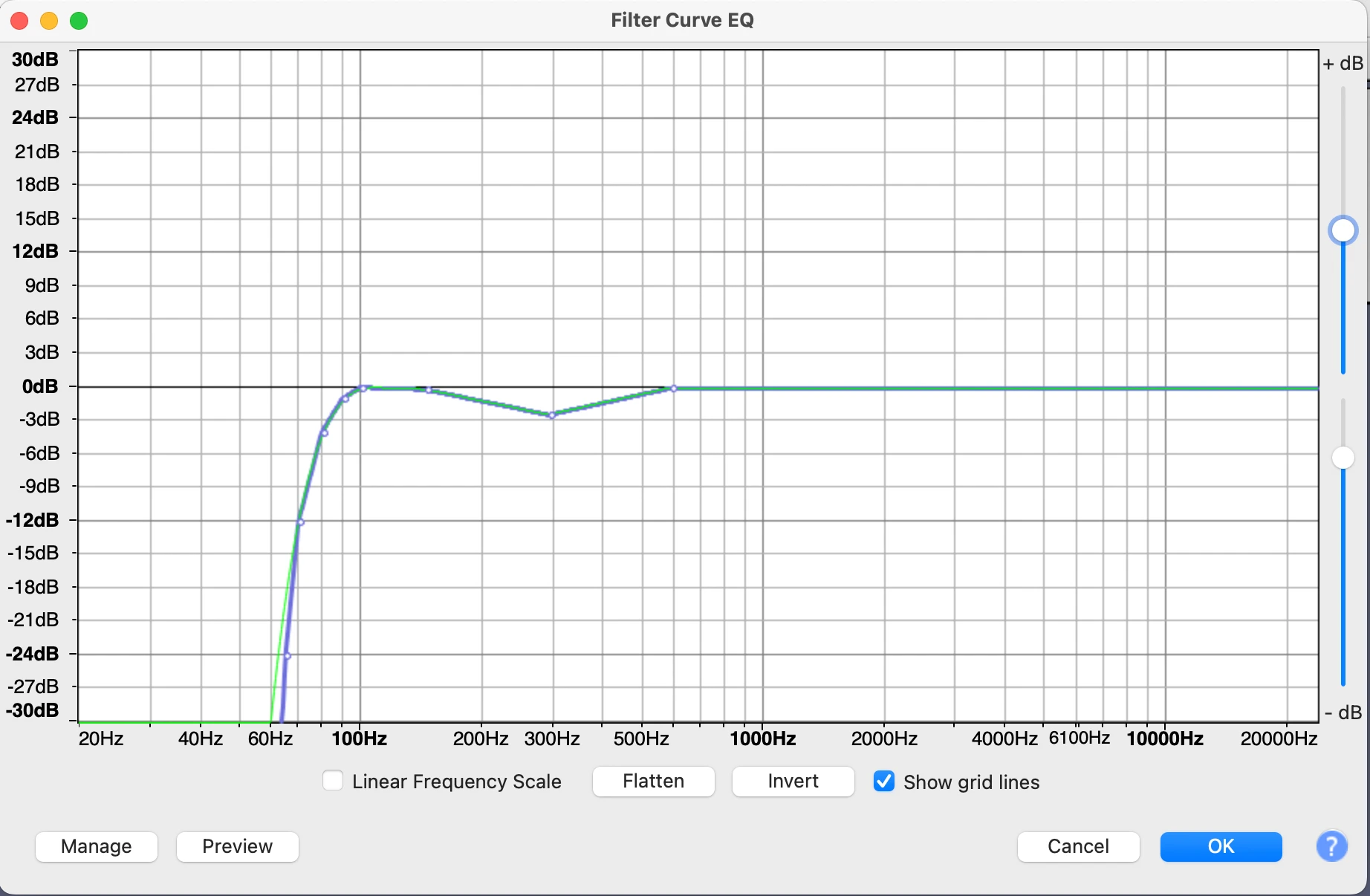
Open Effect → EQ and Filters → Filter Curve EQ.
Load Presets & settings → Factory Presets → Low roll-off for speech to cut the rumble below the voice.
Optionally add a shallow dip in the low mids by clicking on the curve and dragging a point down a few dB. A good start is a dip of about 2 to 3 dB centred near 300 Hz, coming back to 0 dB by about 150 Hz and 600 Hz. Preview it: if the voice sounds thin, make the dip shallower.
Preview and apply.
Go easy. Large EQ cuts make a voice thin and nasal, which can sound worse than the echo.
Step 3: Quiet the echo tails with a Noise Gate
Of Audacity's built-in effects, this is the one that acts on echo most directly. A noise gate turns the audio down whenever it falls below a threshold, so the ringing tail after each sentence fades out faster.
Select a short stretch of the pause after a sentence, where you can hear only the echo tail and room.
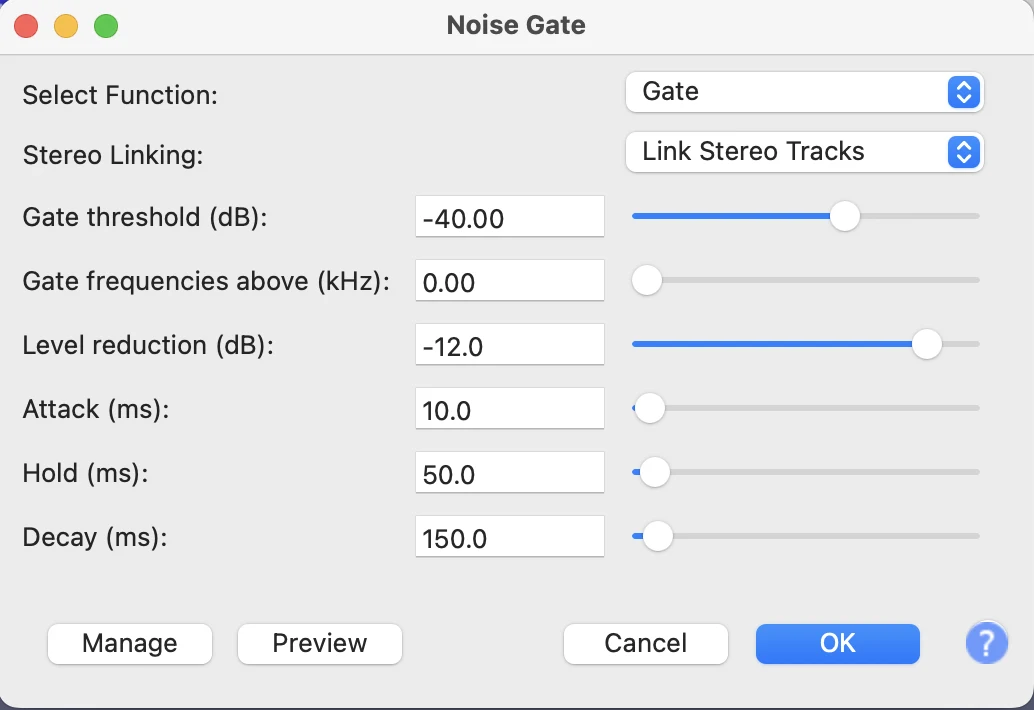
Open Effect → Noise Removal and Repair → Noise Gate.
Set Select Function to Analyze Noise Level and click OK. Audacity reports the level of that stretch.
Select the whole track and open Noise Gate again.
Set Select Function to Gate and set Gate threshold a few dB above the reported level.
Set Level reduction moderately, not to the maximum. At -100 dB the gate cuts sound completely, which makes pauses sound unnaturally dead.
Use a short Attack so words start cleanly, and adjust Hold and Decay so word endings are not chopped off.
Preview, adjust, and click OK.
Starting values that work for most voice recordings: Level reduction -12 dB, Attack 10 ms, Hold 50 ms and Decay 150 ms. If word endings get cut off, raise Hold or Decay. If the tails still ring, lower Level reduction a little further.
Audacity's support site recommends using the gate after noise reduction, so the noise reduction can stay gentle. If the gate opens and closes audibly ("pumping"), lower the threshold or raise Decay.
Step 4: Finish with gentle levels
After gating, the overall level may have dropped. Use Effect → Volume and Compression → Normalize to bring the peaks back up, or Loudness Normalization if the audio is going into a podcast. Avoid strong compression on echoey audio: compression raises the quiet parts, and in a roomy recording the quiet parts are the echo.
A recommended order
Noise Reduction, only if there is hiss or hum, and gently.
Filter Curve EQ: low roll-off, small low-mid dip.
Noise Gate for the tails between words.
Normalize at the end.
When Audacity isn't enough: de-reverb tools
If the echo is still distracting inside the words, Audacity's built-in effects have done what they can. The options:
A third-party de-reverb plugin. Several commercial plugins work inside Audacity. Check that a plugin supports your Audacity version and operating system before buying.
Audacity's free AI plugins. Intel's OpenVINO plugins add Noise Suppression and Music Separation to Audacity, but Audacity's documentation lists no de-reverb effect among them.
A dedicated speech app. Tools that rebuild the voice instead of filtering it can handle echo that filters cannot.
If the recording is on your iPhone: clir Voice Ultra
If the echoey recording came from an iPhone (a voice memo, an interview, a video), one option is to remove the echo on the phone before you edit in Audacity.
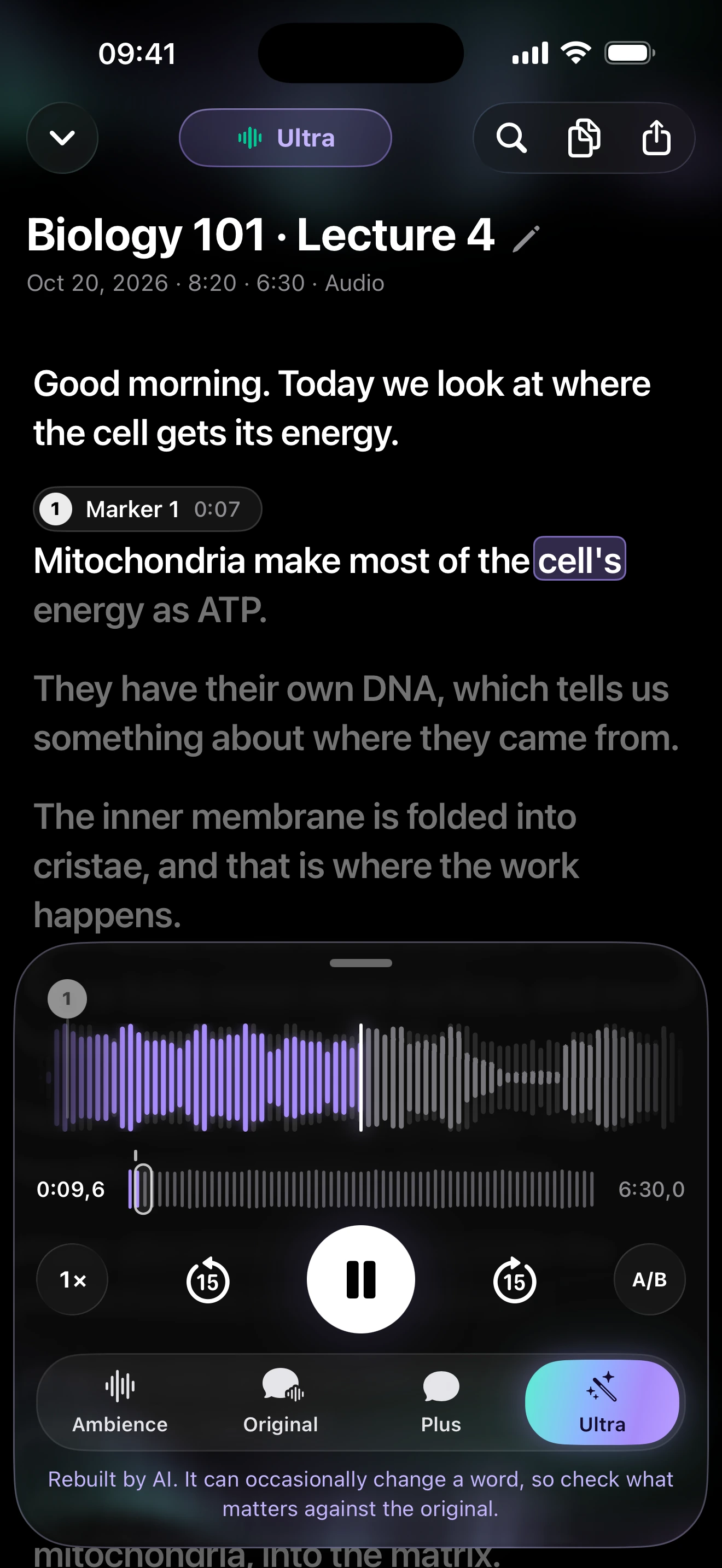
clir VoiceUltra removes background noise and reverb/echo, then rebuilds the voice with AI for a studio-microphone sound. It is meant for echoey rooms, distant speakers and audio you want to publish. You can import recordings from Voice Memos, Files, messaging apps or the camera roll, and compare the result with the original, which always stays available.
Ultra · studio sound
This is a test clip with added room echo: the original, then Plus (noise removal only) and Ultra.
Room echo
Original
Plus
Ultra
Reference words
FIND SOME CRESSWELLS THERE BIG PLANTATIONS RATED AT TWO HUNDRED AND FIFTY THOUSAND DOLLARS
MISS TAYLOR DID NOT KNOW MUCH ABOUT COTTON BUT AT LEAST ONE MORE REMARK SEEMED CALLED FOR
Sample details & credits
Read speech with added noise or room effects. Plus and Ultra processed in clir Voice 2.3 (5), iOS Simulator. Playback loudness adjusted.
LibriSpeech: Vassil Panayotov, Guoguo Chen, Daniel Povey and Sanjeev Khudanpur, from LibriVox audiobooks. CC BY 4.0.
Prevention for next time
Get the microphone close: 10 to 15 cm (4 to 6 inches) from your mouth makes your voice much louder than the room's reflections.
Record in the softest room you have. Rugs, curtains, a sofa and a full bookshelf absorb reflections; a kitchen or bathroom adds them.
Face into the room, not toward a bare wall or window.
Record a short test and listen on headphones before the real take.
Not completely. Audacity has no built-in de-reverb effect. A Noise Gate can shorten the echo tails between words and EQ can reduce boominess, but echo inside the words stays unless you use a dedicated de-reverb plugin or app.
Does Noise Reduction remove echo in Audacity?
No. Noise Reduction is designed for steady noise such as hiss, hum and fans, which it learns from a noise profile. Echo is a delayed copy of your own voice and changes with every word, so Noise Reduction cannot isolate it.
Is there a free dereverb plugin for Audacity?
Audacity's documentation lists no de-reverb effect among its built-in effects or its free OpenVINO AI plugins (Noise Suppression and Music Separation). Third-party de-reverb plugins exist, mostly paid; check that one supports your Audacity version before installing.
What Noise Gate settings reduce echo?
Start by analyzing the level of an echo-only pause, then set the threshold a few dB above it. Use a moderate level reduction rather than the maximum, a short attack, and enough hold and decay that word endings are not cut off.
Why does my recording sound echoey?
The microphone is too far from your mouth, the room has hard, bare surfaces, or both. The voice reaches the mic directly and then again from every wall, and the further away the mic is, the louder those reflections are compared with your voice.