

clir Voice · Audio repair
How to Remove Echo from Video or Audio (iPhone & Free)
How to remove echo from video or audio: free iPhone options (Photos Audio Mix, Voice Memos), web and desktop tools, and clir Voice Ultra.
To remove echo from video on iPhone for free, open the clip in Photos, tap Edit → Audio Mix and choose Studio, which reduces background sound and reverb (this works for videos recorded in Spatial Audio on iPhone 16 or later). For audio recorded in Voice Memos, turn on Enhance Recording. Other files need a de-reverb tool: Adobe Podcast Enhance Speech has a free tier, and on iPhone there are AI apps like clir Voice Ultra (a subscription).
Light room echo can often be reduced a lot. Heavy echo in a large, empty room will improve, but some of it stays. If you can still re-record, reducing echo in the room is always the better fix.
Why echo is hard to remove
Background noise (a fan, traffic) is a separate sound on top of your voice, and software can learn what it sounds like and subtract it. Echo is your own voice, coming back from the walls a few milliseconds later. It overlaps every word and has the same character as the voice itself, so classic noise reduction doesn't touch it. The tools that do work either use AI trained on dry and reverberant speech, or rebuild the voice entirely.
Method 1: iPhone Photos Audio Mix (free, video)
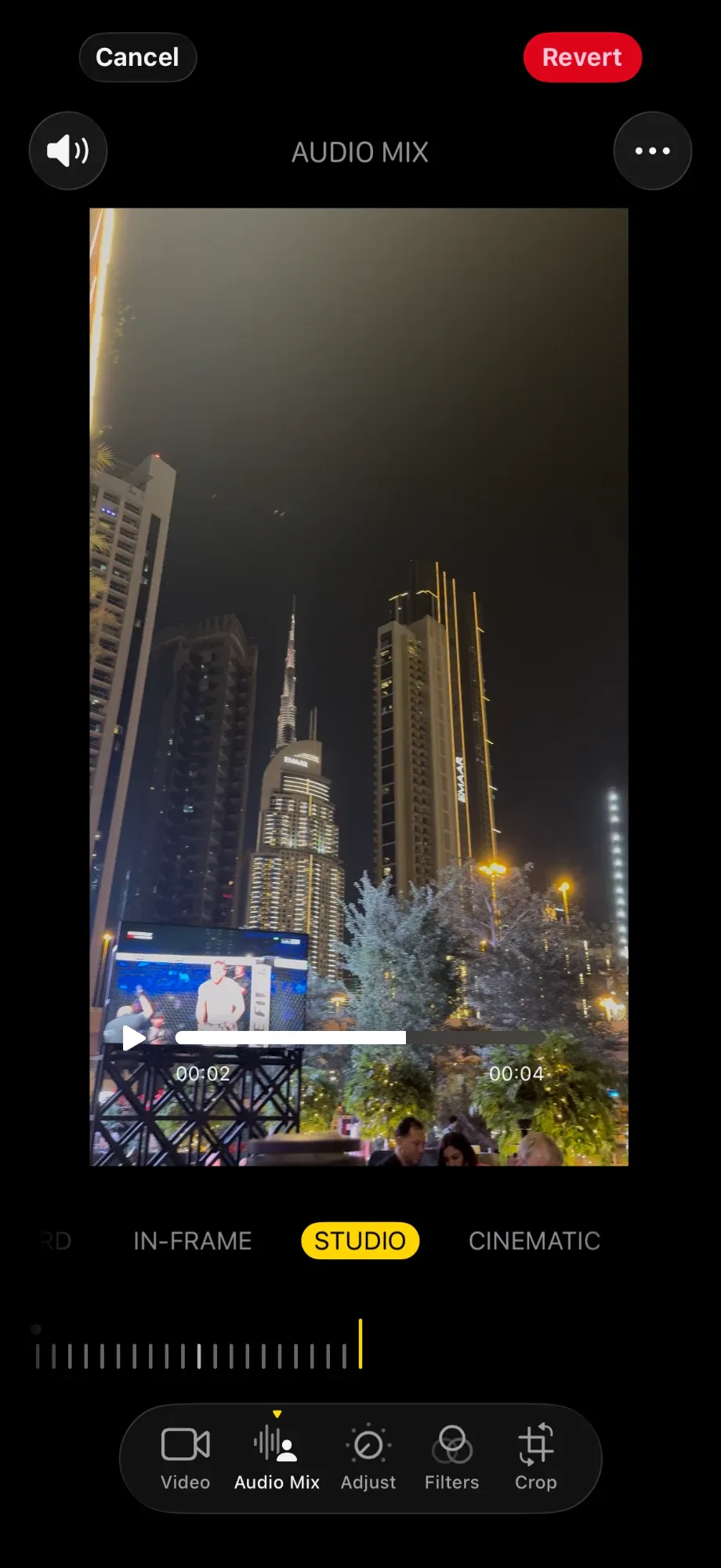
If your video was recorded on iPhone 16 or later with Spatial Audio (the default on those models), Photos can reduce echo directly:
- Open the video in the Photos app.
- Tap the Edit button.
- Tap Audio Mix, then choose Studio. Apple describes it as reducing background sounds and reverb, "to make it sound more like you're recording in a professional studio".
- Drag the slider below the mix options to set the strength.
- Tap Done.
Audio Mix only appears for videos recorded with Spatial Audio. Videos recorded in Stereo or Mono, older iPhone videos, and clips from other cameras don't get it. To keep the option for future videos, check Settings → Camera → Record Sound and leave Spatial Audio selected.
Method 2: Voice Memos (free, audio)
For a recording made in Voice Memos:
- Open Voice Memos and tap the recording.
- Tap the More button (three dots), then tap Options.
- Turn on Enhance Recording for Mono and Stereo recordings. Apple says it reduces background noise and echo.
- For Spatial Audio recordings, turn on Studio Sound instead and drag its slider. Apple says it adjusts the levels of background sound and reverb.
These are playback options inside Voice Memos. When we shared a recording with Enhance Recording turned on, the shared file had the enhancement in it, so you can send the cleaner version without extra steps. Still listen to the shared file once before you rely on it.
Method 3: Free and low-cost desktop and web tools
- Adobe Podcast Enhance Speech (web, free tier). Upload an audio file at podcast.adobe.com and Adobe's AI removes noise and reverb from speech. The free plan has limits on file length and daily use, so check Adobe's current plan details for longer files or video. It can make voices sound slightly processed, so compare with the original.
- Audacity (free). Audacity has no true de-reverb effect. Effect → Noise Removal and Repair → Noise Reduction removes steady background noise and leaves the reflections of your voice alone. A Noise Gate can make the tails between sentences quieter, but the echo inside each word stays. Be wary of tutorials that promise Audacity removes echo.
- DaVinci Resolve. The free version doesn't include the AI audio tools. Voice Isolation and the Dialogue Separator (which splits dialogue, background and ambience) are part of the paid DaVinci Resolve Studio. With Studio you can turn the ambience part down to reduce room sound.
- Adobe Premiere Pro (paid). Premiere has a reverb reduction control in its audio tools and the Enhance Speech feature. Worth it if you already edit in Premiere.
Method 4: clir Voice Ultra (iPhone, audio and video)
clir Voice is one option if the free methods don't apply to your file (an older video, a clip from another camera, a recording from a call or a messaging app) or don't go far enough. Its Ultra version removes background noise and reverb/echo, then rebuilds the voice with AI for a studio-microphone sound. The Plus version removes background noise but leaves the voice as recorded, so for echo, Ultra is the one to try. Both are subscriptions, and the preview is free.
These players use the same read speech with added room echo, processed in the app, as Original, Plus and Ultra:
Original
Plus
Ultra
Reference words
FIND SOME CRESSWELLS THERE BIG PLANTATIONS RATED AT TWO HUNDRED AND FIFTY THOUSAND DOLLARS
MISS TAYLOR DID NOT KNOW MUCH ABOUT COTTON BUT AT LEAST ONE MORE REMARK SEEMED CALLED FOR
Sample details & credits
Read speech with added noise or room effects. Plus and Ultra processed in clir Voice 2.3 (5), iOS Simulator. Playback loudness adjusted.
LibriSpeech: Vassil Panayotov, Guoguo Chen, Daniel Povey and Sanjeev Khudanpur, from LibriVox audiobooks. CC BY 4.0.
Remove echo from a video with Ultra
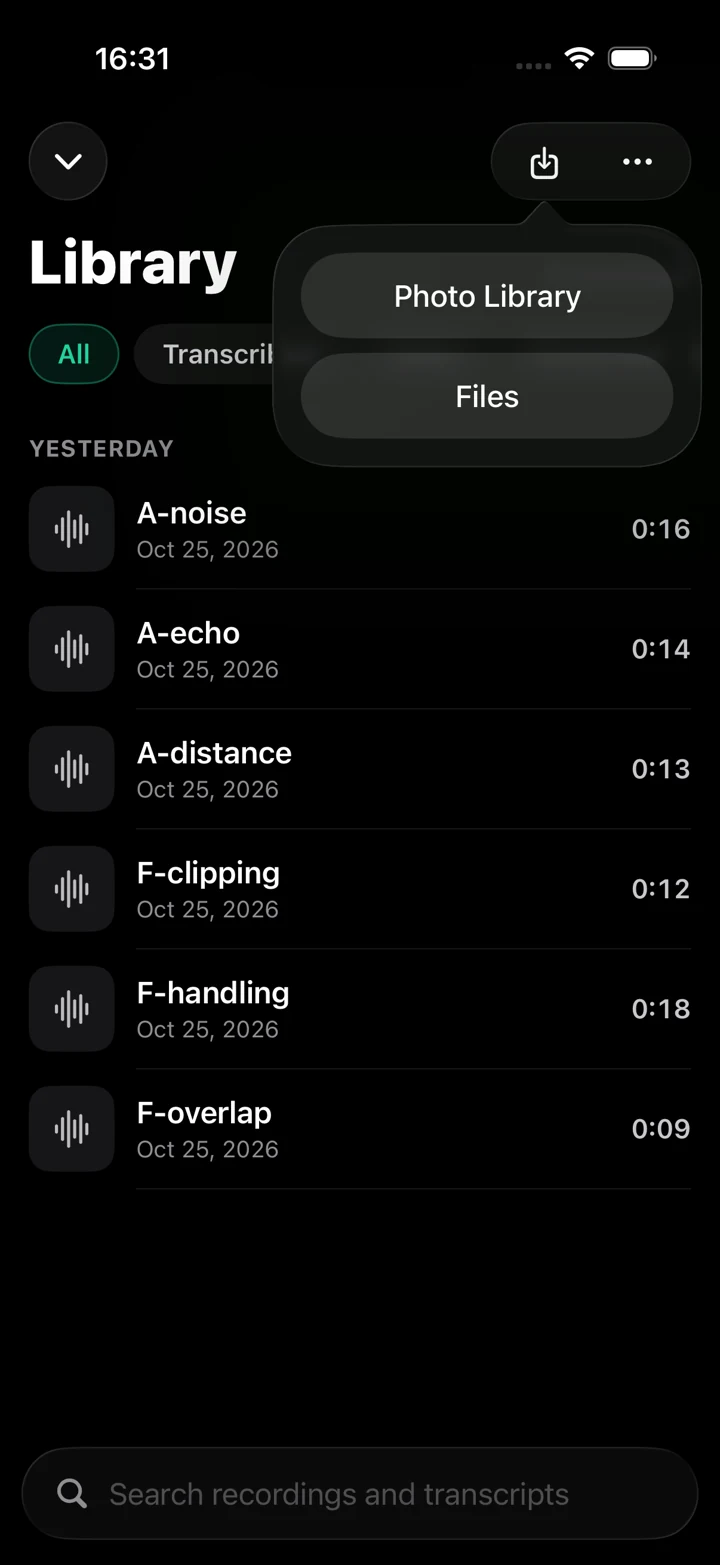
- In clir Voice, tap Import and choose Photo Library or Files.
- Open the clip, select Ultra and tap Generate.
- Hold A/B to hear the Original, release to go back to Ultra. Check a few sentences.
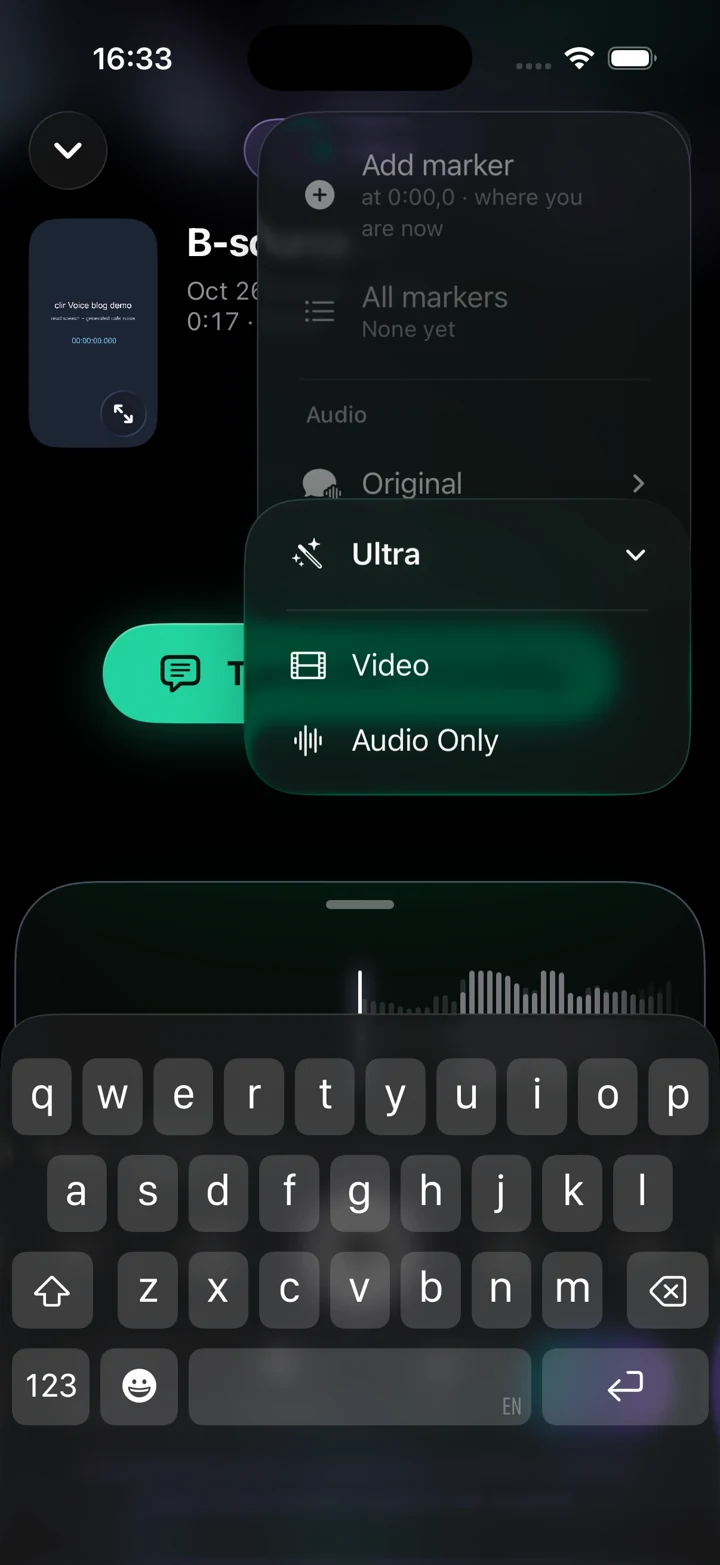
- Tap the share button, choose Ultra → Video (or Audio Only), then Save Video.
clir Voice 2.3 (5) · Simulator
clir Voice 2.3 (5) · Simulator
Here's one clip, first as recorded and then with Ultra:
Words & credits
“Come, come,” said Holmes kindly, “it is human to err, and at least no one can accuse you of being a callous criminal.” “I understand you to say that there are three students who use this stair, and are in the habit of passing your door?” “Yes, there are.”
Speech from LibriSpeech, Vassil Panayotov, Guoguo Chen, Daniel Povey and Sanjeev Khudanpur, from LibriVox audiobooks. CC BY 4.0. Added background noise; Ultra processed in clir Voice.
Because Ultra rebuilds the voice with AI, it can occasionally change a word, so check names, numbers and quotes against the original before publishing. The original stays available, and you can always go back to it.
Video needs an Ultra subscription. Ultra also needs more working memory than Plus and may not be available on some devices, so try the free preview first. Processing happens on the iPhone, and your audio is not uploaded.
Which method should you use?
| Your file | Try first |
|---|---|
| iPhone 16 or later video in Spatial Audio | Photos Audio Mix → Studio |
| Voice Memos recording | Enhance Recording or Studio Sound |
| Audio file on a computer | Adobe Podcast Enhance Speech |
| Any video or audio on iPhone | clir Voice Ultra |
| You're editing in Resolve Studio or Premiere | Their built-in dialogue tools |
Whatever you use, check the result on headphones. Over-processed speech tends to sound watery, metallic or slightly robotic, and the cure is a lower strength. A little leftover room sound is often less distracting than artifacts.
Prevent echo next time
- Record in a small, furnished room, or into a closet full of clothes.
- Put a rug on the floor and hang a duvet or blankets behind the microphone.
- Keep the microphone 15 to 30 cm (6 to 12 inches) from your mouth, or use a lapel mic.
- Don't speak straight into a bare wall.
- On iPhone 16 or later, record video in Spatial Audio so Audio Mix stays available.
The full guide is how to reduce echo in a room for recording. If the problem is noise, see how to clean up an audio recording.
FAQ
Can you remove echo from a video completely?
Not always. Light echo can usually be reduced until it is hard to notice, but strong echo from a large, empty room can only be improved. AI tools that rebuild the voice go furthest, and they can occasionally change a word, so check the result.
How do I remove echo from a video on iPhone for free?
If the video was recorded on iPhone 16 or later with Spatial Audio, open it in Photos, tap Edit → Audio Mix, choose Studio and adjust the slider. For older videos, there is no built-in de-echo option in Photos, so you need an app or a web tool.
Can Audacity remove echo?
Not really. Audacity has no de-reverb effect, and its Noise Reduction is designed for steady background noise. A noise gate can quiet the tails between sentences, but the echo inside the words remains.
Does iMovie remove echo?
iMovie has no echo or reverb removal. On Mac, iMovie has a reduce background noise option, but it targets noise and leaves echo in place. Process the audio with another tool, then bring it back into iMovie.
Why does my recording sound like it's in a tunnel?
That hollow, tunnel-like sound is room reverb: your voice bouncing off hard surfaces and reaching the microphone slightly after the direct sound. It's strongest when the microphone is far from your mouth in a bare room.